The name says it: Internet Protocol Television. But what does sending TV “over IP” actually involve, and why does it matter whether a service uses multicast or unicast, HLS or MPEG-TS? This guide explains the technology behind IPTV in plain terms, from the moment a channel is encoded to the moment your player puts it on screen, and what each part means for picture quality, delays and buffering at home.
What “internet protocol” means here
Internet Protocol (IP) is the addressing and routing system that every device on the internet uses. Data is split into small packets, each labelled with a source and destination IP address, and routers pass them along until they reach the right device. Web pages, video calls and emails all travel this way.
IPTV applies the same idea to television. Instead of a broadcast tower, a satellite or a cable TV signal, the channel travels as IP packets over a broadband network. Anything that speaks IP and can decode video, such as a smart TV, streaming stick, phone or computer, can receive it. If you are new to the concept, start with what IPTV is and how it works.
From camera to packets
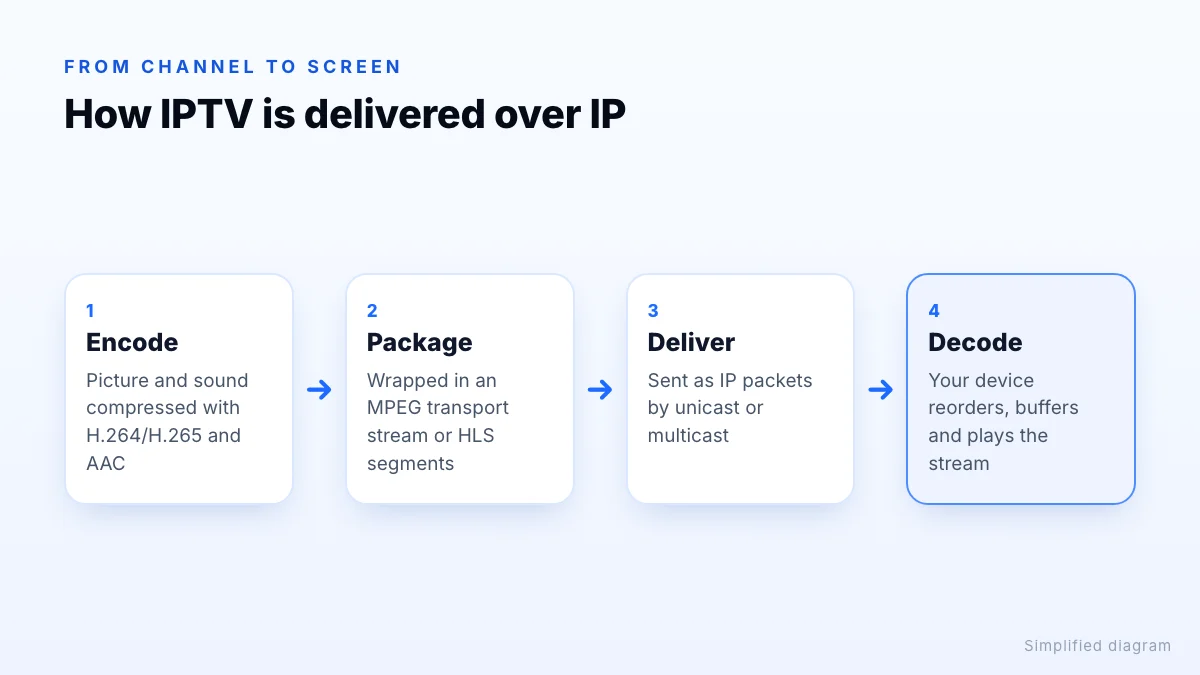
Every IPTV channel goes through the same basic chain before it reaches you:
- Encoding. The live picture is compressed with a video codec such as H.264 (AVC) or H.265 (HEVC), and the sound with an audio codec such as AAC. Compression shrinks the data to a size a home connection can carry.
- Packaging. The compressed audio and video are wrapped in a container format, typically an MPEG transport stream, or cut into short segments for HTTP streaming.
- Delivery. Servers send the data as IP packets across the network, either one shared copy (multicast) or one copy per viewer (unicast).
- Decoding. Your device collects the packets, puts them back in order, decompresses the video and plays it, usually holding a few seconds in a buffer to smooth out small delays.
Unicast vs multicast
The biggest technical difference between IPTV systems is how they send a channel to many viewers at once.
| Unicast | Multicast | |
|---|---|---|
| How it works | A separate stream for every viewer | One stream, copied by the network to every viewer who joins |
| Where it's used | Internet IPTV services and streaming apps | Operator IPTV on managed broadband networks, hotels, campuses |
| Network load | Grows with every extra viewer | Roughly the same whether one or a thousand people watch |
| Works over the open internet? | Yes | Generally no; it needs a network configured for it |
| Pause and rewind | Easy, since each stream is individual | Needs extra systems such as network recording |
Multicast relies on the network's routers to copy packets where needed. Devices ask to join a channel using IGMP (Internet Group Management Protocol), which is why switching channels on an operator's set-top box means “leaving” one multicast group and joining another. The public internet does not generally carry multicast between networks, so services that reach you over an ordinary broadband connection use unicast instead.
Streaming formats: MPEG-TS, HLS, DASH and RTP
On top of IP, a few formats do most of the work. You will see their names in player settings and stream addresses:
- MPEG transport stream (MPEG-TS). A container designed for broadcasting that carries video, audio and data such as subtitles. Many IPTV channels are sent as a continuous transport stream over HTTP, often with a
.tsaddress. - HLS (HTTP Live Streaming). The stream is cut into short segments listed in an M3U8 playlist that the player keeps refreshing. Because it runs over ordinary web traffic, it passes easily through home routers and content delivery networks. HLS is published as IETF RFC 8216.
- MPEG-DASH. An international standard that works similarly to HLS, more common in large streaming apps than in IPTV players.
- RTP and UDP. Lightweight protocols used on managed networks, especially with multicast. RTP adds sequence numbers and timing so packets can be reordered and played smoothly.
If you load channels with a playlist link, these addresses are what the playlist points to; our guide to M3U playlists shows what the entries look like.
Why some players offer 'TS' or 'HLS' options
Managed IPTV vs internet IPTV
Both are IPTV, but they reach you differently. Managed IPTV is TV from a broadband provider, delivered over its own network to its own set-top box. The provider controls the whole path, so it can reserve bandwidth and use multicast. Internet IPTV services send streams across the open internet to apps on devices you already own. They are more flexible about devices and location, but quality depends more on your home connection and Wi-Fi.
What this means for viewers
- Buffering happens when packets arrive more slowly than the video plays. Speed, Wi-Fi quality and congestion matter most; see our internet speed guide.
- Delay behind live comes from encoding, segmenting and buffering. HTTP-based streams are often several seconds behind broadcast TV, so a neighbour watching on an aerial may cheer a goal before you see it.
- Channel switching is usually slower on internet IPTV than on cable, because the player has to request a new stream and fill its buffer.
- Codecs decide which devices can play a stream. 4K channels in HEVC need a device with hardware HEVC decoding.
Jitter, packet loss and the buffer
Packets don't always arrive evenly. Some take longer than others (jitter) and a few go missing altogether (packet loss), particularly on busy Wi-Fi or at peak times. Players cope by holding a few seconds of video in a buffer before playing it, so small hiccups are absorbed without you noticing. When delays last longer than the buffer, playback pauses to refill it, which is what buffering is. A wired connection reduces both jitter and loss, and a slightly larger buffer setting, where your player offers one, can smooth out short drops at the cost of a longer wait when you change channel.
The bottom line
IPTV is television carried as internet protocol packets: encoded, packaged, delivered and decoded. Operators on their own networks lean on multicast and RTP, while internet IPTV services use unicast HTTP streams such as HLS and MPEG-TS that work on any broadband connection. Knowing the difference explains most of what you notice as a viewer, from a few seconds of delay to the occasional buffer. To see how it works on your own connection, request a trial and follow the setup guide.