
“IPTV streaming” covers several different things: a football match playing live, a film you start on a Sunday afternoon, last night's news replayed from the guide. They all arrive the same way, as streams over your internet connection, but they behave differently, and knowing why helps you get a better picture and fewer interruptions. This guide explains what an IPTV stream is, where streams come from, and what affects their quality.
What an IPTV stream is
A stream is video and audio sent as a continuous flow of data that your device plays as it arrives, keeping only a few seconds in reserve (the buffer). Nothing has to be downloaded in full first, and nothing is kept on the device afterwards unless you record it.
In IPTV, each channel or video is a separate stream with its own address. Your player app asks for a stream, receives it from the service's servers, decodes it and puts it on screen. If you want the networking details, our guide to how IPTV uses internet protocol covers formats such as HLS and MPEG-TS.
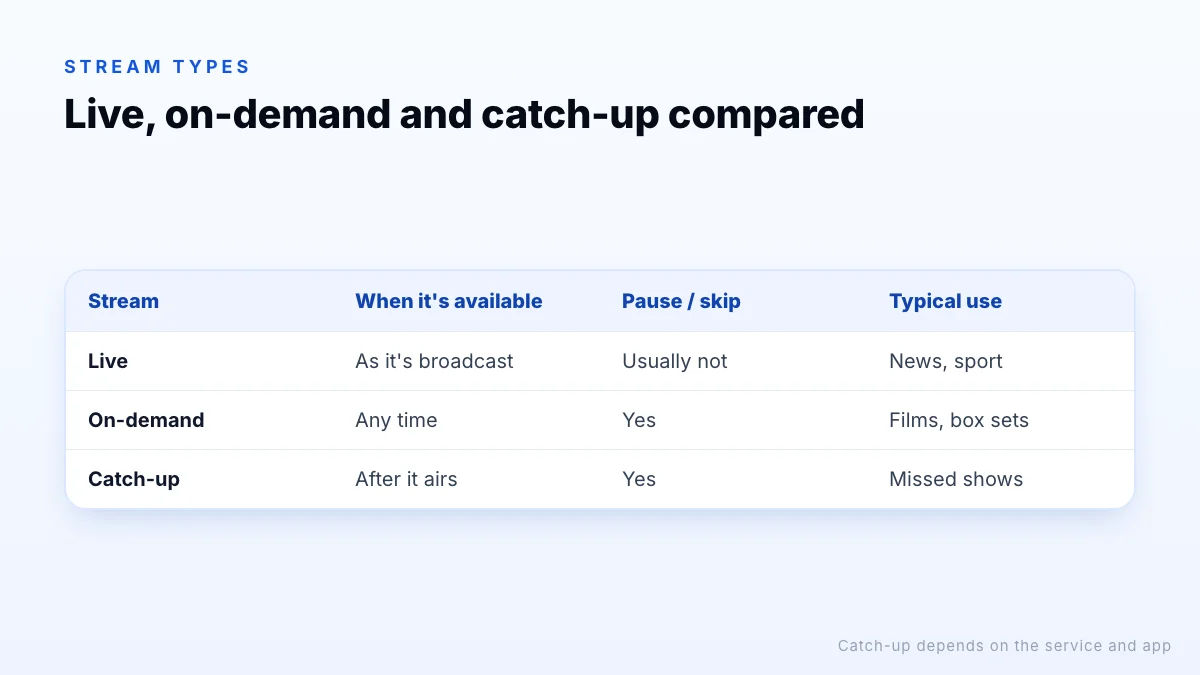
Live, on-demand and catch-up streams
| Stream type | What it is | Can you pause or skip? | Typical use |
|---|---|---|---|
| Live | A channel playing in real time | Usually not, unless the app buffers or records | News, sport, events |
| On-demand (VOD) | A film or episode stored on a server | Yes | Films and box sets |
| Catch-up | A recording of a programme that has aired | Yes | Shows you missed, where offered |
Live streams are the most demanding: the video is being encoded as it happens, so there is little room to send data ahead, and every viewer watches the same moment. On-demand streams are easier for players to buffer, which is why a film often starts smoothly on a connection that struggles with a live match. Catch-up depends on the service recording the channel and on your app supporting it.
Where IPTV streams come from
Every stream starts with a source: the original feed of a channel or the master file of a film. For a live channel, the source is the broadcaster's output, which the service receives, encodes into one or more qualities and passes to streaming servers. For on-demand content, the source is a video file encoded in advance.
The source has a big influence on what you see. A channel produced in HD can be offered in a “4K” version, but it will only be upscaled. Ads, logos and on-screen graphics come from the source too.
A word on 'free sources'
The path from source to screen also explains why IPTV lags slightly behind broadcast TV. Each step, from encoding to segmenting and buffering, adds a little delay, so a live stream is often several seconds behind the same channel on an aerial or satellite. That is normal and isn't a fault, though it can mean hearing a neighbour cheer a goal before you see it.
Why stream quality varies
Two streams labelled “HD” can look quite different. The main reasons:
- Bitrate. The amount of data per second. More data usually means more detail, especially in fast motion.
- Codec. H.265 (HEVC) delivers similar quality to H.264 at a lower bitrate, but needs a device that can decode it.
- Frame rate. Sport at 50 or 60 frames per second looks smoother than 25 or 30.
- Source quality. A stream can only be as good as the feed it started from.
- Your connection. Some streams adapt to your speed and drop quality when the connection is busy.
That is why IPTV channel lists often include 4K, FHD and HD versions of the same channel: you choose the stream that your screen and connection handle best. Our guide to IPTV channels explains how those versions are organised.
Adaptive and fixed-quality streams
Some streams are adaptive: the service encodes several qualities and the player switches between them as your connection speeds up or slows down. That keeps playback going on a weak connection, at the cost of a softer picture for a while. Others are fixed: one quality per stream, which is why IPTV lists often offer separate 4K, FHD and HD versions of a channel. With fixed streams you choose the trade-off yourself, and switching to a lighter version is the quickest fix when a channel buffers.
Recording and timeshift
Because a live stream is just data arriving at your device, some player apps can save it. Recording writes the stream to device or USB storage so you can watch later; timeshift keeps a rolling buffer so you can pause live TV for a few minutes. Both depend on the player and the device's free storage rather than on IPTV itself, and catch-up, where the service keeps recordings on its servers, only works on channels where it is offered.
IPTV streaming vs streaming apps
Netflix, Disney+ and similar apps stream on-demand libraries from one company, through that company's own app. IPTV services centre on live channels with a TV guide, usually alongside on-demand content, and work through third-party player apps on many devices. Both rely on the same streaming technology; the difference is the content and how you access it. Our what is IPTV guide compares IPTV with cable, satellite and streaming apps in more detail.
Getting smooth streams at home
- Use Ethernet, or 5 GHz Wi-Fi close to the router.
- Pick a quality your connection can sustain; see the internet speed guide.
- Pause downloads and game updates on other devices during live events.
- Keep your player app and device software up to date.
- If one channel stutters, try its FHD or HD version before changing anything else.
Still buffering? Our IPTV troubleshooting guide works through the checks in order.
The bottom line
IPTV streaming is TV and video delivered as continuous streams to a player app: live channels in real time, on-demand titles when you choose, and catch-up where offered. Each stream starts from a source and is encoded into a quality with its own bitrate, codec and frame rate, which is why picking the right version of a channel matters as much as your connection speed. To see how streams perform in your home, request a trial and compare the 4K, FHD and HD versions of the channels you watch.