Behind every TV channel delivered over IP is a headend: the equipment that brings video in, turns it into streams and sends it out to screens. Telecom operators run very large headends; hotels, hospitals, universities and stadiums run smaller ones to deliver TV to rooms, wards and concourses. This guide explains what a headend does, the equipment at each stage, how middleware and platforms fit in, how hotel IPTV systems work, and what to plan for if you are considering one.
What an IPTV headend is
The term comes from cable TV, where the headend was the facility that received channels and fed them into the cable network. In IPTV, the headend does the same job for an IP network: it receives sources, converts them into IP streams, applies protection and organisation, and hands them to the network for delivery. Everything the viewer sees on screen, from the channel list to the picture quality, is shaped here. For how the streams travel, see how IPTV uses internet protocol.
Headend equipment, stage by stage
| Stage | Equipment | What it does |
|---|---|---|
| Reception | Satellite receivers (IRDs), terrestrial and cable tuners, IP inputs | Receives licensed channels |
| Local sources | HDMI/SDI encoders, media servers | Adds cameras, signage and in-house channels |
| Processing | Encoders and transcoders | Compresses video and creates the qualities each screen needs |
| Protection | Encryption, DRM or conditional access | Restricts viewing to authorised devices |
| Distribution | Multicast streamers, streaming servers, CDN | Sends streams across the network |
| Management | Monitoring and alarms | Detects failed channels and equipment |
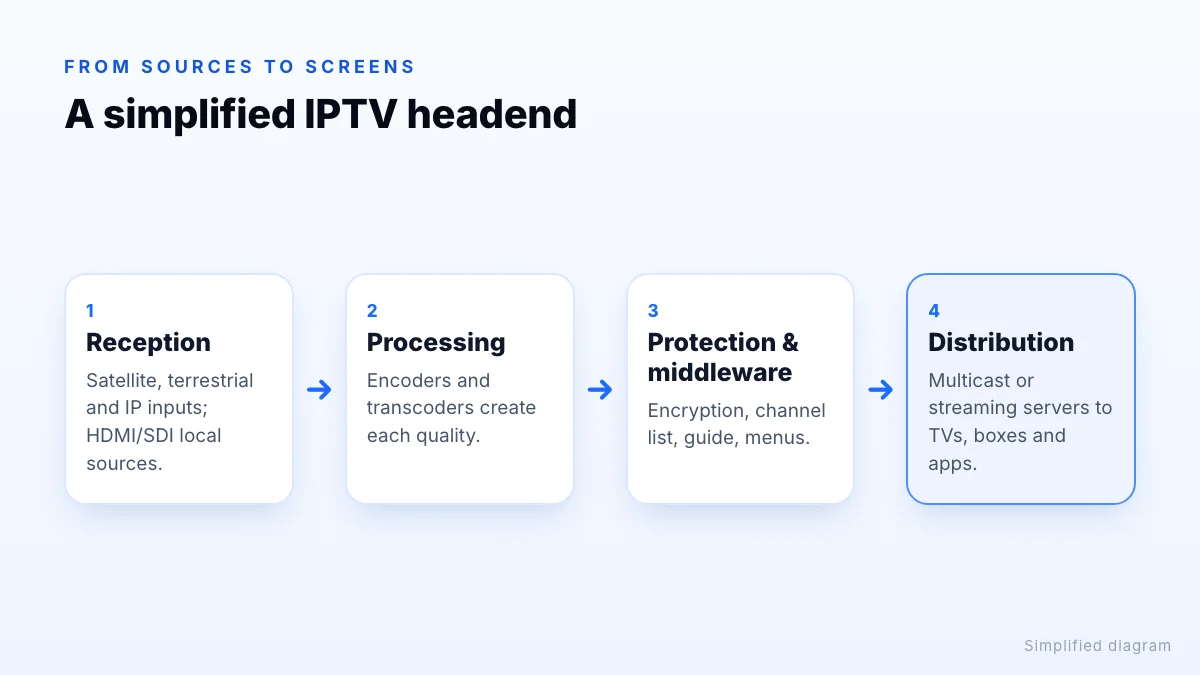
Local sources are where HDMI encoders come in: a camera in a conference room or a digital signage player can become a channel alongside broadcast ones. Our HDMI to IPTV converter guide covers encoders in detail.
Middleware and the viewer experience
Middleware is the software layer between the streams and the viewer. It provides the channel list and TV guide, the on-screen menus, user or room accounts, video on demand, recordings where offered, and the apps or set-top box software viewers use. In a hotel it often adds a branded welcome screen, information pages and links to services such as room service or checkout. Good middleware is what makes an IPTV system feel simple to use; poor middleware makes even a reliable headend frustrating.
IPTV platforms and “solutions”
Vendors usually sell an “IPTV platform” or “IPTV solution”: the headend, middleware, apps or set-top boxes, and management tools as one package, often with installation and support. When comparing them, look at:
- which screens are supported: specific TV brands, set-top boxes, phones or browsers;
- how channels are received and whether the vendor helps with channel licensing;
- content protection and how it meets broadcasters' requirements;
- monitoring, remote support and spare parts;
- integration with other systems, such as a hotel's property management system;
- total cost over several years, including licences and support contracts.
Hotel IPTV systems
Hotels are among the most common users of small and medium headends. A typical hotel system receives licensed channels, adds the hotel's own content, encodes everything and multicasts it over the hotel network to TVs in rooms, either directly to hospitality-mode smart TVs or through set-top boxes. Common features include:
- a welcome screen with the guest's name, linked to the property management system;
- channel line-ups in several languages for international guests;
- information about the hotel, local area and services;
- casting from guests' phones, and on-demand content, on some systems.
Encoders for hotels
Hospitals, campuses and stadiums
The same architecture appears elsewhere with different priorities. Hospitals often combine patient TV with information channels and sometimes charge for bedside entertainment. Universities and schools distribute lectures, events and news channels across campus. Stadiums and arenas feed hundreds of screens in concourses and hospitality areas with low delay, so fans don't see a goal on a screen after hearing the crowd. Each changes the balance between latency, scale, content protection and interactivity.
Reliability
Because a headend serves every screen, a single failure can take out every channel. Larger systems use redundant power supplies, spare encoders that take over automatically and monitoring that alerts staff when a channel drops, so problems are fixed before guests or patients notice.
Network requirements
In-building IPTV usually relies on multicast, so one stream per channel serves every room watching it. That needs a network designed for it: switches that support IGMP snooping and a querier, separation of TV traffic from guest Wi-Fi and business systems, and enough capacity for the channel line-up at its chosen qualities. Poorly configured multicast can flood a network with video, so it's worth involving network engineers early.
Plan for growth too. Adding channels later multiplies multicast traffic on shared links, and adding 4K channels raises it sharply. Documenting which channel uses which multicast address, and keeping TV on its own network segment, makes later changes and troubleshooting far easier.
Licensing the channels
Distributing TV channels to guests, patients or the public is a commercial use. Hotels and other venues generally need agreements with broadcasters, or a licensed provider that holds them, for each channel they carry, and some content, especially live sport in public areas, has separate commercial licensing. A domestic subscription is not enough. Reputable IPTV system vendors either handle channel licensing or tell you clearly what you need to arrange.
Planning a project
- Count screens and locations, and decide between smart TVs and set-top boxes.
- List the channels and local content you need, and how each will be licensed.
- Survey the network for multicast readiness and capacity.
- Define the experience: guide, welcome screen, languages, integrations.
- Plan support: monitoring, response times and who fixes what.
- Pilot first on a floor or wing before rolling out everywhere.
A pilot exposes most problems cheaply: TVs that need a firmware update, rooms with weak cabling, channels whose guide data doesn't match, and staff who need training to help guests. Fixing those before a full rollout saves far more than it costs.
The bottom line
An IPTV headend receives sources, turns them into protected IP streams and distributes them, with middleware shaping what viewers see. Platforms and solutions bundle the headend with apps, boxes and management, and hotel systems add guest-facing features on a multicast network. Plan the network and the channel licensing as carefully as the equipment, and pilot before a full rollout. If you are looking for TV for your own home rather than a building, our guide to IPTV services is the better starting point.